Can one department or one person have different screenshot or idle settings?
For owners and admins
Yes, on Business: Settings → Departments & people. Each department or person follows the company until you set something different.
- 1Open Settings → Departments & people.
- 2On a department’s row, choose screenshots on or off, how often, and idle time.
- 3For one person, pick them under Give one person their own settings… and do the same.
- 4To undo, click the reset arrow on that row.
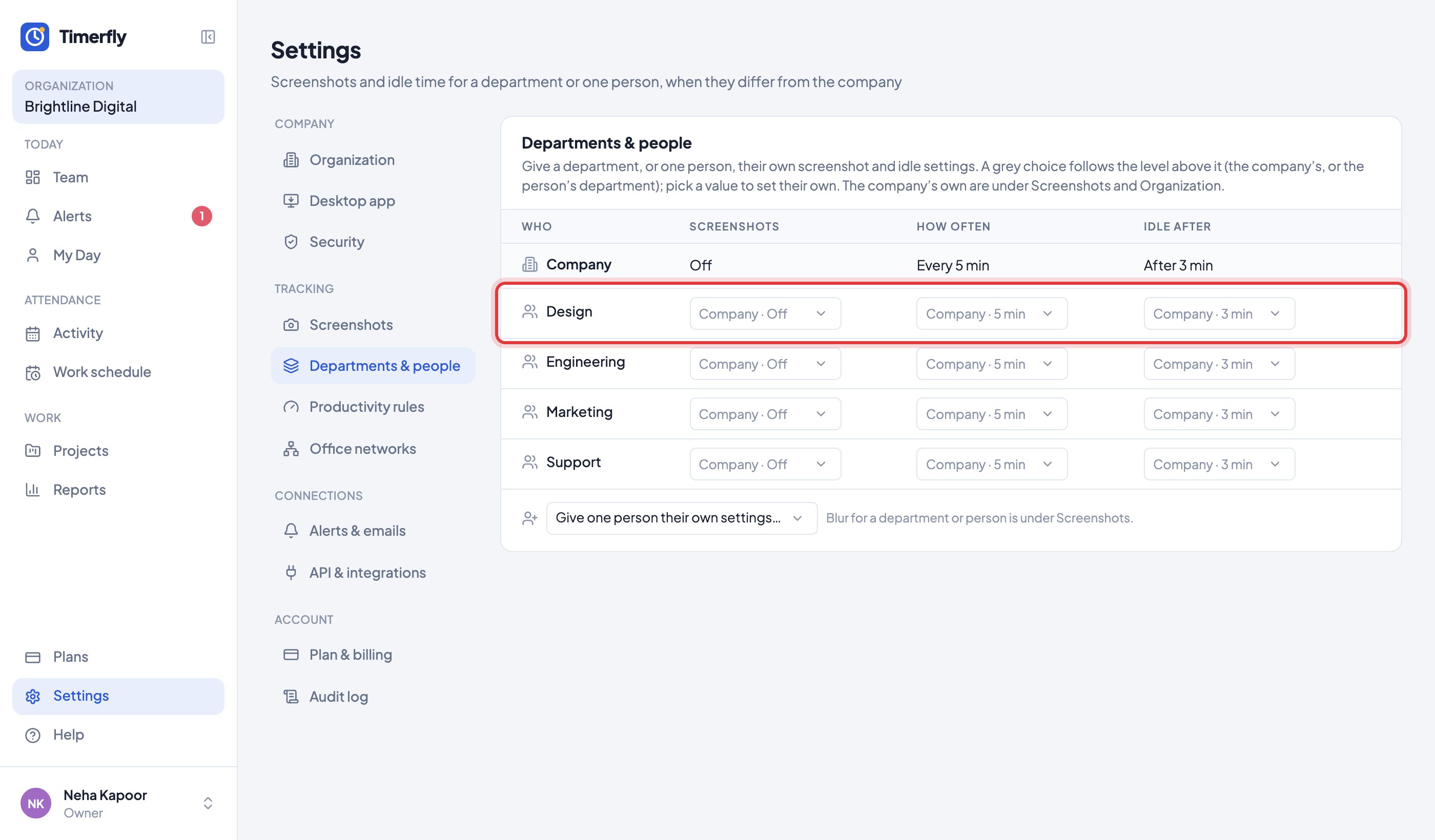
A grey choice says where its value comes from, like “Design · 10 min”. The apps pick up a change within a minute.
Still stuck? We’re happy to help.
Ask usMore on tracking and privacy
- What does Timerfly record?
- Are window titles recorded?
- Are screenshots taken?
- Where do I see screenshots? Can I delete one?
- Can screenshots be blurred?
- Can Timerfly show who works from the office and who works remotely?
- Can we allow sign-in only from the office?
- How long is our data kept?
- Do I need to tell my employees?
New to Timerfly?
Try every feature free for 14 days.