How do I ask for time off?
For employees
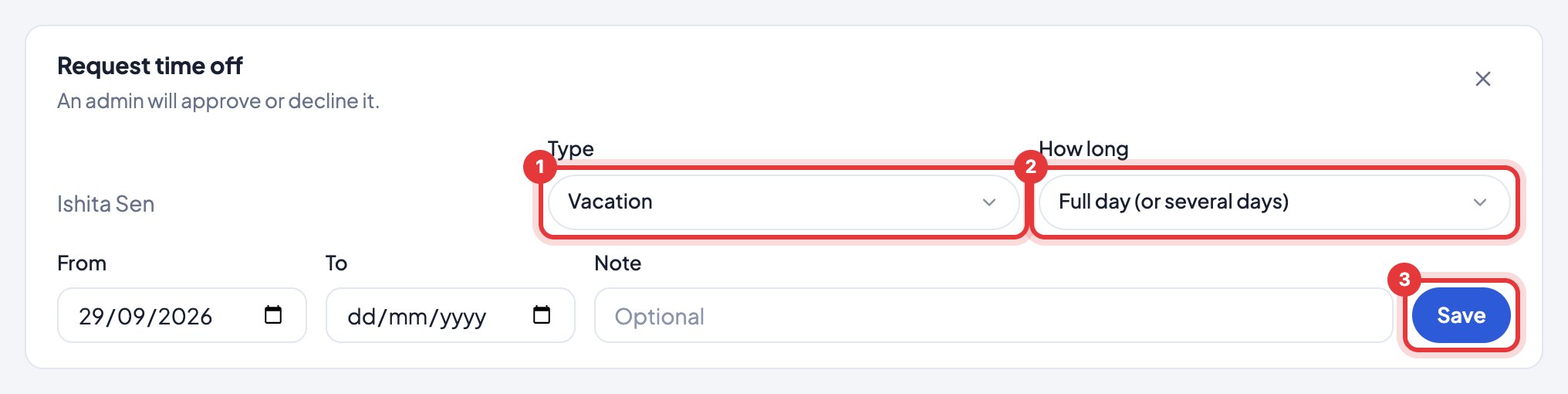
On Activity, click Request time off, choose the type and the days, and send. Your manager or admin approves it.
- 1Open Activity and click Request time off.
- 2Choose the Type (vacation, sick, unpaid…).
- 3Under How long, choose a full day (or several), the first half, the second half, or a few hours.
- 4Pick the dates and click Save.
It shows as pending (striped) on the calendar until it’s approved. You can remove it until then.
You get an email as soon as it’s approved or declined.
Still stuck? We’re happy to help.
Ask usMore on attendance and leave
- Why was I marked late?
- Why does it say absent?
- What does "Left early" mean?
- How do I approve leave?
- Can someone take half a day, or just a few hours, off?
- How do I add public holidays and festivals?
- How do I mark leave without pay (LOP)?
- How do I add a meeting or field work?
- How do I read the Activity calendar?
- Someone worked on their day off. Does it show?
New to Timerfly?
Try every feature free for 14 days.