Timesheet software
Timesheets that fill themselves in
Timerfly records each person’s hours from their computer, day by day and by project, so nobody types a timesheet at the end of the week. Export to Excel, or share a project’s hours with your client.
Updated
The short answer
- Timerfly is employee timesheet software for teams at computers.
- The desktop app records each person’s hours by itself, with breaks and idle time.
- Reports show the hours day by day and export to Excel or PDF on every plan.
- On Pro, hours are tracked by project and task, time away from the computer is approved, and clients can see their project’s hours through a private link.
What your timesheets look like in Timerfly
Hours fill themselves in
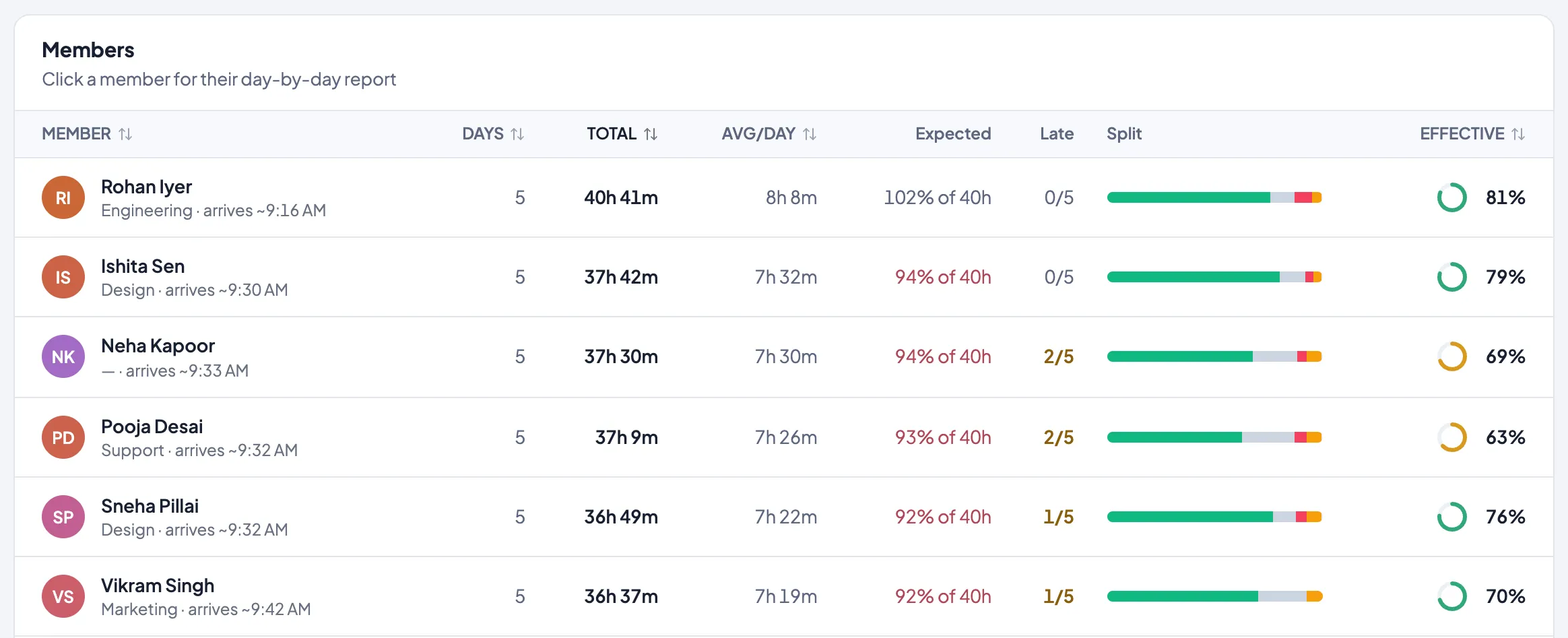
The desktop app records each person’s day from their computer: start, finish, breaks and idle time. Nobody types hours into a sheet at the end of the week.
Day by day, person by person
Reports show every person’s hours for any dates, with arrival and leaving times, productive and idle time and breaks, for one department or the whole company.
Download as Excel or PDF
Export a summary with one row per person, or day by day with one row per person per date and a total for each person. Every plan.
Time away from the computer
Client visits, calls and meetings are added as offline time and approved by a manager, so the timesheet is complete (Pro).
Hours by project and task
People pick the project and task in the app as they work; each project shows its time entries, total hours and who worked on it (Pro).
A link for your client
Share a project’s hours with a client through a private report link: no login, and you can turn it off at any time (Pro).
Every person’s hours, for any dates
Pick the dates and the department, then download the day-by-day Excel for payroll or client billing.
Three ways to keep timesheets
| How | Good for | Keep in mind |
|---|---|---|
| An Excel or Google Sheet | Free, and everyone knows it | People fill it in from memory at the end of the week; late, missing and rounded entries |
| A timer app (Clockify, Toggl and similar) | Good for client billing, often with a free plan | Someone has to start and stop the timer; forgotten timers mean wrong hours |
| Recorded from the computer (Timerfly) | Hours and attendance without anyone typing or starting anything | Only for people who work at Windows or Mac computers; no invoicing |
Need attendance too? The same hours give late, left early and absent marks from each shift, and a monthly attendance Excel for payroll on Pro: see attendance software. Comparing tools: the 10 best time tracking tools in India.
Who uses it
Agencies
Hours by client project, shared with the client through a link, without chasing the team for timesheets.
IT services
Proof of hours for clients billed by the hour, including US and UK shifts that cross midnight.
CA firms
Time per client file in busy season, and attendance for payroll from the same app. For CA firms.
Price
Hours from the computer, reports and Excel and PDF exports are on every plan, from ₹159 per person a month billed yearly. Pro, at ₹279, adds projects and tasks, client report links, offline time with approvals and the payroll Excel. Prices in rupees with a GST invoice. All plans.
Questions
What is employee timesheet software?
Software that records the hours each person works, by day and often by project, so you can pay them, bill clients or check workloads. Some tools make people type their hours or start a timer; others record the hours from the computer by themselves.
Can timesheets be filled automatically?
Yes, for people who work at a computer. Timerfly’s desktop app records the work day by itself, including breaks and idle time, so the hours are there without anyone typing them. Time away from the computer is added as offline time and approved.
Can I track hours by project and client?
Yes, on Pro (₹279 per person a month, billed yearly): people choose the project and task in the app, and each project shows its hours and time entries. You can share a project’s hours with a client through a private link. Timerfly does not pick the project by itself.
Can I export timesheets to Excel?
Yes, on every plan: a summary with one row per person, or day by day with arrival, leaving, hours, breaks and idle time for each person and date. There is also a PDF of the report as you see it.
Does Timerfly make invoices?
No. It gives you the hours by person and project, as Excel or a client link, to use in your own billing or accounting software.
How much does timesheet software cost in India?
Timerfly starts at ₹159 per person a month billed yearly (₹199 monthly), with projects and client links on Pro at ₹279. Every feature is free for 14 days, no card needed.
Stop chasing timesheets
14 days of every feature, no card needed. Install the app on a few computers and see tomorrow’s hours filled in.
Prefer help? We’ll set it up with you in 15 minutes